C# (pronounced “C Sharp”) is a modern, object-oriented programming language created by
Microsoft.
You can use C# to build:
Desktop apps (WinForms, WPF)
Web apps (ASP.NET Core)
Mobile apps (Xamarin / MAUI)
Games (Unity)
IoT apps
Cloud apps (Azure)
//Structure of a Basic C# Program
using System;
class Program
{
static void Main()
{
Console.WriteLine("Hello C#!");
}
}
Explanation:
using System; → imports namespaces
class Program → class declaration
static void Main() → starting point of program
Console.WriteLine() → prints text on screen
Variables
A variable is used to store data in a program.
Each variable has a data type, a name, and an optional initial value.
Syntax for declaring variables:-
int age = 25;
string name = "Vishal";
double price = 99.50;
bool isActive = true;
char grade = 'A';
Types of Variables in C#
C# variables are mainly classified into 3 categories:
1. Local Variables
Declared inside a method, constructor, or block.
Can only be used within that method/block.
Must be initialized before use.
Example:
void Test()
{
int number = 10; // local variable
Console.WriteLine(number);
}
2. Instance Variables (Non-static Fields)
Declared inside a class, but outside any method.
Every object has its own copy of instance variables.
Example:
class Person
{
public string name; // instance variable
public int age; // instance variable
}
3. Static Variables (Static Fields)
Declared with the static keyword.
Shared by all objects of the class.
Only one copy exists in memory.
Example:
class Counter
{
public static int count = 0; // static variable
}
4. Constant Variables
Declared with const
Value cannot be changed after initialization.
Must be assigned at declaration.
Example:
const double PI = 3.14;
5. Readonly Variables
Declared with readonly
Value can be set in declaration or in constructor only.
After that, it becomes fixed.
Example:
class Demo
{
public readonly int year;
public Demo()
{
year = 2025;
}
}
6. Parameter Variables
Variables declared inside method parameters.
Example:
void Add(int a, int b) // a and b are parameter variables
{
}
7. Array Variables
Used to store multiple values of the same type.
Example:
int[] marks = { 10, 20, 30 };
8. Dynamic Variables
Declared using dynamic keyword.
Type is checked at runtime.
Example:
dynamic data = 10;
data = "Hello"; // valid
Data Types
C# data types are mainly divided into 3 categories:
Value Types
Reference Types
Pointer
Value Types: Stores data directly into the memory (stack).
A variable of a value type stores the actual data directly into the memory.
These are derived from the System.ValueType class and are usually stored on the stack.
When you assign a value type to another variable, a copy of the value is made,
so changes to one variable do not affect the other.
When to Use Value Types: Choose value types for small, immutable data structures that represent a single value.
Examples of Value Types:
int
float
double
decimal
char
bool
Reference Types: Stores a reference (memory address) to the actual data
Reference data types are types where a variable stores a reference (memory address) to the actual data, rather than storing the data itself.
This means that when you assign one reference variable to another,
both variables point to the same object in memory - changes made through one variable are reflected in the other.
Stored on the heap (the reference itself is stored on the stack, but the object is on the heap).
Multiple variables can reference the same object.
Garbage Collector (GC) automatically frees memory when no references remain.
Common Reference Types in C#
string
class
object
interface
array
delegate
using System;
namespace ProgramDataTypes
{
class Program
{
static void Main(string[] args)
{
// value type
int a = 5;
int b = a; //in output value b is 5.
Console.WriteLine(b);
// reference type
var arr1 = new int[]{1,2};
var arr2 = arr1;
arr2[0] = 99; //arr1[0] also changes.
foreach (var num in arr1)
{
Console.WriteLine(num);
}
}
}
}
Basics of C#
Basics of C# include Structure of C#, Variables, Data Types and Operators.
Class & Object
Class: Definition: A class is like a blueprint or template for creating objects.
Purpose: It defines the structure (attributes/fields) and behavior (methods/functions) that the objects created from it will have.
Example: Think of a Car Company.
They create a design (class) → which tells how cars should look and have properties like:
Color
Model
Speed
Engine capacity
But this design alone is not a real car. It is just a plan or blueprint.
In programming:
A class contains Data (called fields or properties) Actions/behaviors (called methods)
A class does not occupy memory until you create an object.
// Class Example
public class Human
{
public string Name;
public int Age;
public void Speak()
{
Console.WriteLine("I can speak!");
}
}
Object: Definition: An object is an instance of a class.
Purpose: It represents a real-world entity with actual values for the attributes defined in the class.
An object is a real example created from a class.
From the Car blueprint, you can create many actual cars:
Car 1 → Red, 120 km/hr
Car 2 → Blue, 100 km/hr
Each created car is an object. In programming:
An object is created using the new keyword and occupies memory.
Human h1 = new Human();
h1.Name = "Vishal";
h1.Age = 25;
Human h2 = new Human();
h2.Name = "Rahul";
h2.Age = 30;
h1.Speak();
h2.Speak();
Value Type vs Reference Type
Value types (like int, struct) directly hold the value and are usually stored on
the stack; assignment copies the actual value. Reference types (class, arrays) store a reference
to the object on the heap; assignment copies the reference so both variables point to the same
object.
// value copy
int a = 5;
int b = a; // b is 5, independent
// reference copy
var arr1 = new int[]{1,2};
var arr2 = arr1;
arr2[0] = 99; // arr1[0] also changes
Constructors
Constructors initialize new objects. There are default constructors (no
parameters), parameterized ones, and static constructors (run once per type). Use parameterized
constructors to ensure required values are provided when creating an object.
public class Car {
public string Model { get; }
public Car(string model) => Model = model;
}
var c = new Car("Sedan");
Access Modifiers
C# access modifiers control visibility: public (everyone),
private (inside type), protected (derived types),
internal (same assembly). You can combine them (protected internal, private
protected).
Generic Class
A generic class uses a type parameter to work with different types safely. It
avoids casting and increases reusability.
public class Box {
public T Value { get; set; }
public Box(T v) => Value = v;
}
var intBox = new Box(10);
Encapsulation
Encapsulation hides internal state and exposes behaviour through
methods/properties. It protects data from invalid changes and gives a clear API for consumers.
Inheritance
Inheritance lets a class reuse code from a base class. Use it for an “is-a”
relationship (Dog is-an Animal). Avoid deep hierarchies—prefer composition when suitable.
Polymorphism
Polymorphism means many forms: at runtime, a base type reference can run
overridden methods of derived types (virtual/override). It's essential for flexible, extensible
designs.
public class Animal { public virtual void Speak() => Console.WriteLine("..."); }
public class Dog : Animal { public override void Speak() => Console.WriteLine("Woof"); }
Abstract Class vs Interface
Abstract classes can contain implementation and state; interfaces define contracts
(methods/properties) and, in recent C# versions, can have default implementations. Use
interfaces for loose coupling and abstractions.
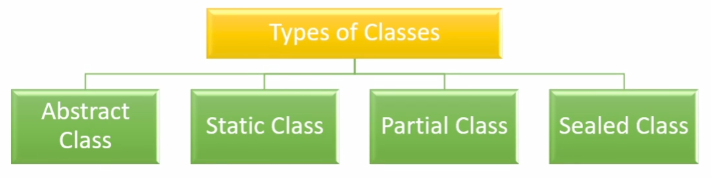
Sealed Class
Sealed prevents other classes from inheriting. Use sealed for security,
performance, or when extension is not intended.
Array vs List
Array has fixed length and slightly less overhead. List is resizable and
provides convenient methods (Add, Remove). Use List for collections that change size.
Dictionary
Dictionary is a fast key-value lookup. Use when you need to find
values quickly by key.
IEnumerable vs IQueryable
IEnumerable runs in-memory and is great for local collections. IQueryable builds
expression trees so providers like EF can translate queries into SQL and run them on the server.
LINQ Basics
LINQ provides a readable way to query collections (Select, Where, GroupBy). It
improves clarity and reduces boilerplate loops.
var evens = numbers.Where(n => n % 2 == 0).ToList();
var names = people.Select(p => p.Name);
FirstOrDefault vs SingleOrDefault
FirstOrDefault returns the first match or default if none; SingleOrDefault expects
exactly one result and throws if there are multiple—use Single when you expect one result.
Delegate
A delegate is a type-safe reference to a method. It's like a function pointer and
is useful for callbacks and passing behaviour.
public delegate int Calc(int a, int b);
int Add(int x,int y) => x+y;
Calc c = Add;
Console.WriteLine(c(2,3)); // 5
Events
An event exposes a delegate but prevents external code from raising it. It's the
usual pattern for publish/subscribe within types (e.g., button click).
Func / Action / Predicate
Built-in delegates: Func returns a value, Action returns void, Predicate returns
bool. They simplify passing small methods or lambdas.
Async & Await
Async/await lets you write non-blocking code that looks synchronous. Use async for
I/O-bound work (file, network). Avoid blocking calls like .Result on async tasks.
public async Task<string> FetchAsync(string url) {
using var client = new HttpClient();
return await client.GetStringAsync(url);
}
Thread vs Task
A Thread maps to an OS thread. A Task is a higher-level abstraction used with the
thread pool and async/await. Prefer Task for async and scalable I/O code.
Garbage Collection
The .NET GC frees unreachable managed objects. It's generational (Gen 0/1/2). For
unmanaged resources, implement IDisposable and call Dispose or use using.
Boxing & Unboxing
Boxing wraps a value type into an object (heap allocation). Unboxing extracts it
back. Avoid boxing in tight loops because of allocations and performance cost.
IDisposable / using
IDisposable allows deterministic release of resources. Prefer using statements to
ensure Dispose is called even if exceptions occur.
using (var s = File.OpenRead("file.txt")) {
// use stream
}
Reflection
Reflection inspects types at runtime (properties, methods). Useful for DI,
serializers, or tools, but slower and bypasses compile-time checks—use carefully.
Singleton & DI (short)
Singleton provides one instance but is hard to test. Dependency Injection (DI) is
preferred for decoupling; it makes testing and swapping implementations easy.